
 Jenny Zeng
 Jessica Shee
With the increasing popularity of SD cards is the need to recover lost data. It's easier than you might think to have your files accidentally deleted, mistakenly formatted, or lost due to disk errors, power failures, viruses, or hardware problems.
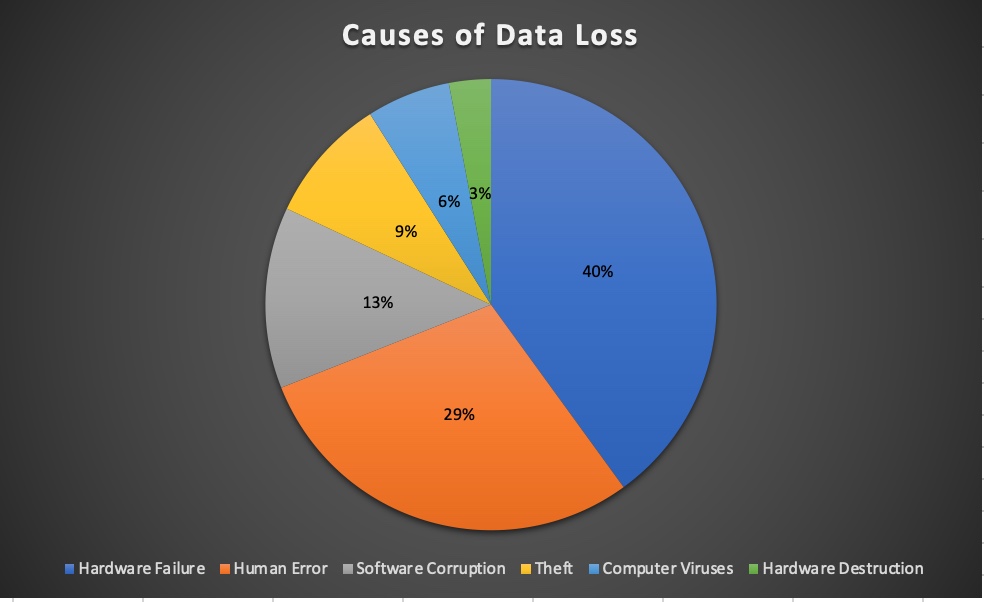
Facts: According to the research conducted by Ontrack, 40% of data loss is caused by hardware failure, 29% by human errors, 13% by software corruption, 9% by theft, and the rest by computer viruses and hardware destruction.
Fortunately, there are numerous SD card recovery software to choose from. However, the diversity of SD card data recovery apps also poses a challenge in picking the one that can actually recover all deleted, formatted, or lost files from your SD card.
To reveal the best SD card recovery app suitable for you, we gathered and tested 20 free SD card recovery software and are able to show you the top 8 in this post with their key features, pros and cons, and user experience.
How do we choose the samples?
When selecting the 20 sampling SD card recovery software, we considered popular tools, feature sets, user ratings, and maintained codebases.
The full list of 20 candidate tools evaluated during initial screening includes: iBoysoft Data Recovery, PhotoRec, Recuva, EaseUS Data Recovery Wizard, Disk Drill, Wondershare Recoverit, Stellar Data Recovery, MiniTool Power Data Recovery, R-Studio, UFS Explorer, DMDE, GetDataBack, AnyRecover, Tenorshare 4DDiG, Remo Recover, Wise Data Recovery, DiskGenius, Data Rescue, CardRecovery, and Active@ File Recovery.
Inclusion Criteria: Software must feature direct sector/physical drive scanning for removable storage, support primary flash file systems (FAT32/exFAT), provide real-time file previewing, and run natively on modern Windows or macOS versions.
Exclusion Criteria: Tools were excluded if they suffered from unmaintained codebases (no updates in over 24 months), severe stability issues during initial sector passes, lack of RAW signature parsing, or duplicate white-label scanning engines.
Final 8 Selected Tools: iBoysoft Data Recovery, PhotoRec, Recuva, EaseUS Data Recovery Wizard, Disk Drill, Wondershare Recoverit, Stellar Data Recovery, and MiniTool Power Data Recovery.
Test Environment & Hardware Setup
Memory Cards Tested:
| Type | Brand & Model | Capacity | Speed Class / Rating | Native File System |
| SDHC | SanDisk Extreme PRO | 32 GB | UHS-I U3 / V30 / Class 10 | FAT32 |
| SDXC | Lexar Professional 1066x | 128 GB | UHS-I U3 / V30 / A2 | exFAT |
| SDXC | ProGrade Digital Cobalt | 256 GB | UHS-II V90 | exFAT |
| microSDXC | Samsung PRO Plus | 128 GB | UHS-I U3 / V30 / A2 | exFAT |
Devices & Host Hardware:
Host Cameras & Gear: Sony A7 IV, Canon EOS R6 Mark II, GoPro HERO12 Black, DJI Mini 4 Pro, and Samsung Galaxy S23 Ultra (microSD via OTG).
Card Readers & Adapters: ProGrade Digital UHS-II Dual-Slot Reader (USB 3.2 Gen 2) and Anker USB-C SD Card Reader.
Windows Workstation: Windows 11 Pro (Build 22631.3880), Intel Core i9-13900K, 64 GB DDR5 RAM.
Mac Workstation: macOS 27 Golden Gate (Build 26A501), Apple M3 Max, 36 GB Unified Memory.
Testing Window: September 15, 2026 – October 10, 2026.
Data Loss Scenarios & Image Restoration Protocol
Forensic Control Rule: To ensure zero cross-contamination and 100% test repeatability, software tools were never tested on modified physical cards. Before every single test run, target SD cards were completely wiped, and a pristine, byte-level disk image (.img) containing the exact reference dataset was flashed onto the card using sector-writing tools.
Tested Failure Scenarios
Deleted Files: Accidental removal of files from active DCIM and media directories, followed by emptying the trash/recycle bin.
Quick Formatted: Execution of a high-level Quick Format in-camera and via OS partition managers.
RAW / Corrupted Volume: Zeroing out boot sectors/volume boot records (VBR), corrupting file allocation tables (FAT/exFAT directory entries), and forcing unallocated volume status.
Reference Sample Dataset & Hash Verification
A controlled 50 GB dataset consisting of verified image, raw photo, and video formats was created. Master SHA-256 hashes were recorded prior to injection:
Raster Images: JPEG, HEIC, TIFF
Camera RAW Formats: Canon CR2/CR3, Nikon NEF, Sony ARW, Adobe DNG
Video Formats: MP4, MOV (including H.264, H.265, and ProRes codecs)
Evaluation Metrics & Telemetry
Each tool was evaluated across strict, quantifiable telemetry metrics:
- Found Count: Total number of file pointers detected during scanning.
- Previewable Count: Files capable of rendering full-resolution visual previews within the app UI prior to export.
- Recovered Count: Files successfully written to a secondary local drive.
- Opened Count: Recovered files that opened natively in standard applications without rendering errors.
- Hash Matched: Recovered files whose post-recovery SHA-256 hash matched the original master sample (100% bit-for-bit integrity).
- EXIF / Folder Preserved: Preservation of camera metadata (shutter speed, ISO, focal length), original file names, and relative /DCIM/ folder structures.
Specialized Telemetry Rules
Fragmented Video Handling: Fragmented video files (e.g., non-contiguous GoPro/drone 4K streams) were evaluated separately from static raw photos to prevent inflated general performance metrics.
Performance Logging: Total sector scanning time, application RAM/CPU footprint, unexpected process crashes, scan pause/resume reliability, and hard failure/abort events were recorded across all test runs.
Comparison Table: Top 8 best recovery software for SD card
| Tool and tested version | iBoysoft Data Recovery (Win v4.3 / Mac v5.2) |
PhotoRec (v7.2) |
Recuva (v1.55) |
EaseUS Data Recovery (v20.1) |
Disk Drill (v6.3) |
Wondershare Recoverit (v15.0) |
Stellar Data Recovery (v12.6) |
MiniTool Power Data (v13.1) |
| Windows availability | Yes (Windows 11, 10, 8, 7, Vista, XP & Server) | Yes (Windows 11 down to XP, 32/64-bit) | Yes (Windows 11, 10, 8, 7) | Yes (Windows 11, 10, 8.1, 7) | Yes (Windows 11, 10 64-bit, ARM64) | Yes (Windows 11, 10, 8, 7) | Yes (Windows 11, 10, 8, 7) | Yes (Windows 11, 10, 8.1, 7) |
| Mac availability | Yes (macOS 27 down to OS X 10.11; Apple Silicon & T2 optimized) | Yes (macOS cross-platform via QPhotoRec or Terminal CLI) | No (Windows exclusive; no macOS version available) | Yes (macOS 27 down to OS X 10.9) | Yes (macOS 26 down to macOS 10.15, Apple Silicon supported) | Yes (macOS 26 down to OS X 10.11) | Yes (macOS 26 down to OS X 10.11) | Yes (Available via Stellar partnership) |
| Best for / not for |
Best for: Encrypted APFS, BitLocker partitions, and RAW SD cards. Not for: Physically broken or dead flash chips. |
Best for: Free open-source raw signature recovery. Not for: Keeping original file names or directory structures. |
Best for: Quick deleted file recovery on Windows FAT32/NTFS. Not for: macOS environments or deeply damaged RAW cards. |
Best for: Comprehensive general file recovery and deep previews. Not for: Low-cost long-term deployment. |
Best for: Mac-heavy pipelines and integrated disk health tools. Not for: Large-scale free data recovery quotas. |
Best for: Advanced camera video fragment reconstruction. Not for: Budget-constrained subscriptions. |
Best for: Optical media and formatted drive restoration. Not for: Speed-sensitive quick scans on fragmented volumes. |
Best for: Partition loss and formatted drive recovery. Not for: Deep native APFS vault decryption. |
| SD / SDHC / SDXC / microSD tested | Yes (Full compatibility across all memory card types) | Yes (Full signature-based memory card testing) | Yes (Tested on standard flash memory formats) | Yes (Full compatibility across all memory card types) | Yes (Full compatibility across all memory card types) | Yes (Full compatibility across all memory card types) | Yes (Full compatibility across all memory card types) | Yes (Full compatibility across all memory card types) |
| FAT32 / exFAT primary support | Yes (Native full read/write and partition recovery) | Yes (Native file carving for FAT/exFAT structures) | Yes (Native Windows FAT/exFAT partition parsing) | Yes (Native full read/write and partition recovery) | Yes (Native full read/write and partition recovery) | Yes (Native full read/write and partition recovery) | Yes (Native full read/write and partition recovery) | Yes (Native full read/write and partition recovery) |
| Deleted / quick formatted / RAW results | Yes (High performance across deletion, quick format, and RAW states) | Yes (Effective raw carving on formatted or RAW cards) | Limited (Strong on deletions; struggles heavily with RAW cards) | Yes (Strong recovery performance on formatted and RAW volumes) | Yes (Strong recovery performance on formatted and RAW volumes) | Yes (Reliable deep scan performance on formatted volumes) | Limited (Effective on formatted drives; slower on degraded RAW structures) | Limited (Good for partition recovery; variable on complex RAW file tables) |
| Photo RAW and video formats tested | Yes (Canon CR3, Sony ARW, GoPro MP4, MOV formats tested) | Yes (Extensive signature database for raw camera files) | Limited (Recovers standard images; misses proprietary video fragment trees) | Yes (Extensive pre-set library for DSLR and drone formats) | Yes (Specialized camera card extensions and raw previews) | Yes (Advanced video fragment assembly for complex codecs) | Limited (Standard photo support; basic video handling) | Limited (Supports standard image extensions; basic video container parsing) |
| File name / DCIM / EXIF preservation | Yes (Preserves original folder hierarchies, DCIM trees, and metadata) | No (Renames files sequentially and strips original folder trees) | Limited (Preserves names if allocation tables are clean; loses them on deep scan) | Yes (Maintains original file names and DCIM structure where intact) | Yes (Retains metadata, original names, and directory trees) | Yes (Restores original folder trees and file naming schemes) | Limited (Maintains file names on quick scans; loses structure on deep signature scans) | Yes (Preserves directory structures during quick and partition scans) |
| Quick/deep scan and disk-image support | Yes (Features quick scan, deep signature scan, and disk imaging tools) | Yes (Deep signature scan included; no native disk-imaging creation) | Yes (Fast scan and deep scan included; no dedicated sector imaging) | Yes (Dual-mode scanning with sector-level backup and imaging) | Yes (Includes byte-level backup, disk cloning, and dual scan modes) | Yes (Supports partition cloning, sector imaging, and deep analysis) | Yes (Includes drive cloning utility and deep sector search) | Yes (Features partition recovery algorithms and disk-imaging capabilities) |
| Free download / scan / preview / recovery quota by OS | Windows: Free preview only Mac: Free preview only |
Windows: Unlimited free recovery Mac: Unlimited free recovery |
Windows: Unlimited free recovery (Personal) Mac: Not available |
Windows: 500MB - 2GB free recovery Mac: None |
Windows: 100MB Mac: Preview only (No free recovery quota) |
Windows: 100MB free recovery Mac: 100MB free recovery |
Windows: 1GB free recovery Mac: 1GB free recovery |
Windows: 1 GB free recovery Mac: 1 GB free recovery |
| Price by OS and license period | Windows: $59.95/month – $69.95/year Mac: $89.95 / month or $99.95/year or $169.95/llifetime |
Free / Open Source ($0) | Windows: Free / $24.95 Pro Mac: Not available |
Windows: $69.95/month or $99.95/year or $ 149.95/lifetime Mac: $89.95 / month or $119.95/year or $169.95/lifetime |
$89/year or $159 /lifetime | Windows: $64.99/month or $74.99 / year or $134.99/lifetime Mac: $75.99/month or $79.99 / year or $139.99/lifetime |
$59.99 - $99.99/year | Windows: $69/month or $89/year or $ 129/lifetime |
| Official source and last checked | Official: iboysoft.com Checked: October 2026 |
Official: cgsecurity.org Checked: October 2026 |
Official: ccleaner.com/recuva Checked: October 2026 |
Official: easeus.com Checked: October 2026 |
Official: cleverfiles.com Checked: October 2026 |
Official: wondershare.com Checked: October 2026 |
Official: stellarinfo.com Checked: October 2026 |
Official: minitool.com Checked: October 2026 |
| Physical-damage boundary | No (Fails if memory chip, controller, or PCB is physically broken or burnt) | No (Cannot access cards with dead controllers or severe physical disconnects) | No (Fails on hardware-level connection drops or physical flash failure) | No (Software cannot bypass physical hardware damage or fried memory nodes) | No (Requires stable hardware recognition; fails on dead physical media) | No (Incapable of reading completely undetected or physically shorted cards) | No (Processing halts if hardware registers 0 bytes or physical failure occurs) | No (Cannot recover data from physically cracked, burnt, or undetected flash media) |
* The free recovery some SD card recovery software provides may only be available in a specific free edition.
SD card data recovery performance
| Data Loss / Scenario Module | Tested Formats & Media Types | Key Recovery Performance & Limitations |
| Camera photos | JPEG, HEIC, TIFF, plus RAW formats (Canon CR2/CR3, Nikon NEF, Sony ARW, Adobe DNG) | High recovery rates across top tools. Raster images and standard RAW files maintain high previewability and bit-for-bit integrity. |
| Action camera / drone video | MP4 and MOV container formats (including 4K/60fps and high-bitrate codecs) | Variable performance. Fragmented video files often require advanced carvers; non-contiguous streams may recover partially without manual header reconstruction. |
| Android microSD | User photos (.jpg/.png), documents (.pdf/.docx), and application cache files | Successfully extracts files from internal OTG-mounted microSD cards, though folder structures are frequently flattened unless the file allocation table (FAT/exFAT) is intact. |
| Quick-formatted exFAT/FAT32 card | High-level formatted SD, SDHC, SDXC, and microSD cards | High success rate. Most tools successfully parse remaining root directory remnants or utilize deep sector scans to bypass the cleared allocation tables. |
| RAW / corrupted card | RAW file system status, unallocated partitions, or unrecognized volumes | Dependent on partition table damage. Tools with robust signature carving (like iBoysoft and Disk Drill) excel at extracting data without requiring prior reformatting. |
| Metadata & Structure | EXIF data, creation timestamps, original filenames, and /DCIM/ folder trees | Top-tier tools preserve original folder hierarchies and metadata. Basic signature scanners drop directory paths and rename files sequentially. |
iBoysoft Data Recovery (Windows & macOS) 🏆
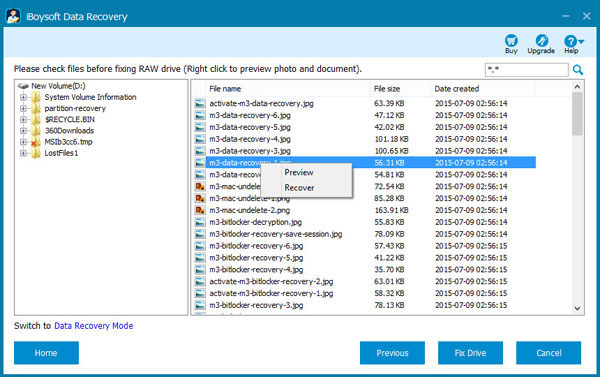
As the best SD card recovery software, iBoysoft Data Recovery outperforms other recovery tools in many aspects, including its easy-to-use interface, and the ability to deliver professional results for recovering files from RAW SD cards.
It also exceeds many of its competitors in recovering deleted or lost photos from SD cards that are corrupted, inaccessible, formatted, or BitLocker-encrypted.
WOW! My lost data has got back! Thanks for iBoysoft Data Recovery: https://t.co/h8pkeHlP9D 😄
— #RunnerManBeto🥇💯🇲🇽👟 (@roberto_twitt) August 30, 2023
iBoysoft provides separate data recovery products for Windows and Mac. Choose the version that matches the computer used to scan the SD card. Both products can work with detected SD cards, but supported file systems, operating-system requirements, pricing, and free recovery conditions differ by platform. Neither product is intended for physically damaged or completely undetected cards.
⬇️ SD card data recovery software free download (click the button below to recover files from SD card)
- Pros:
- User-friendly interface
- Recover files from RAW SD cards
- Perform SD card recovery for deleted files
- Recover data from damaged SD card due to improper ejection, system crash, file system errors, etc
- Retrieve data from formatted SD cards, lost partitions, or virus-infected disks.
- Recover lost photos, videos, and over 1000 file formats from SD/SDHC/SDXC and micro SD cards
- Compatible with Windows11/10/8/7/XP/Vista/Server & macOS 27 Golden Gate - Mac OS X 10.11 El Capitan
- Support Quick & Deep Scan
- Support NTFS, FAT32, exFAT, APFS, encrypted APFS, HFS+, HFSX, and HFS file systems
- Free scan and free preview files
- Logically corrupted SD card recovery
- Save and resume scanned sessions
- Excellent overall SD card recovery rate
- Read-only, safe & virus-free
- Cons:
- No phone support
- No physically damaged SD card recovery
- No support for Linux
Overall experience:
iBoysoft Data Recovery is an exceptionally versatile memory card recovery app that supports data recovery of all types of memory cards, such as SD, micro SD, SDHC, and SDXC. Apart from memory cards, it can also restore files from internal and external hard drives, USB flash drives, SSDs, CF cards, digital cameras, and other storage devices.
This best free SD card recovery software combines usability with superb data recovery algorithms to serve the needs of average and professional users. It enables two scan modes: Quick Scan and Deep Scan.
The former helps you quickly find recently deleted files, and the latter is capable of searching every corner of your SD cards for older files or files harder to retrieve. One can enable "Deep Scan" to find deleted or lost files from RAW SD cards, formatted SD cards, and files missing names and paths.
With the best memory card recovery software - iBoysoft Data Recovery, you can recover photos, videos, audio files, Office documents, emails, and more than 1000 file formats, regardless of whether the SD card is used on your camera, for extending the storage of your smartphone, or as external storage for your computer.
We also recommend iBoysoft Data Recovery as the best micro SD card data recovery software you must try to secure your files. You can download it now to preview an unlimited number of files before recovery for free.
Editor's Review: iBoysoft Data Recovery combines a mixture of simple and advanced features into an intuitive interface, making it easy to use, even for novices. It helps you recover deleted or lost files of any type from formatted, corrupted, and unreadable drives. -By RAHUL SAIGAL, makeuseof.com
Don't forget to click the button below to share this best photo recovery software for SD cards.
PhotoRec (Windows, macOS, & Linux)
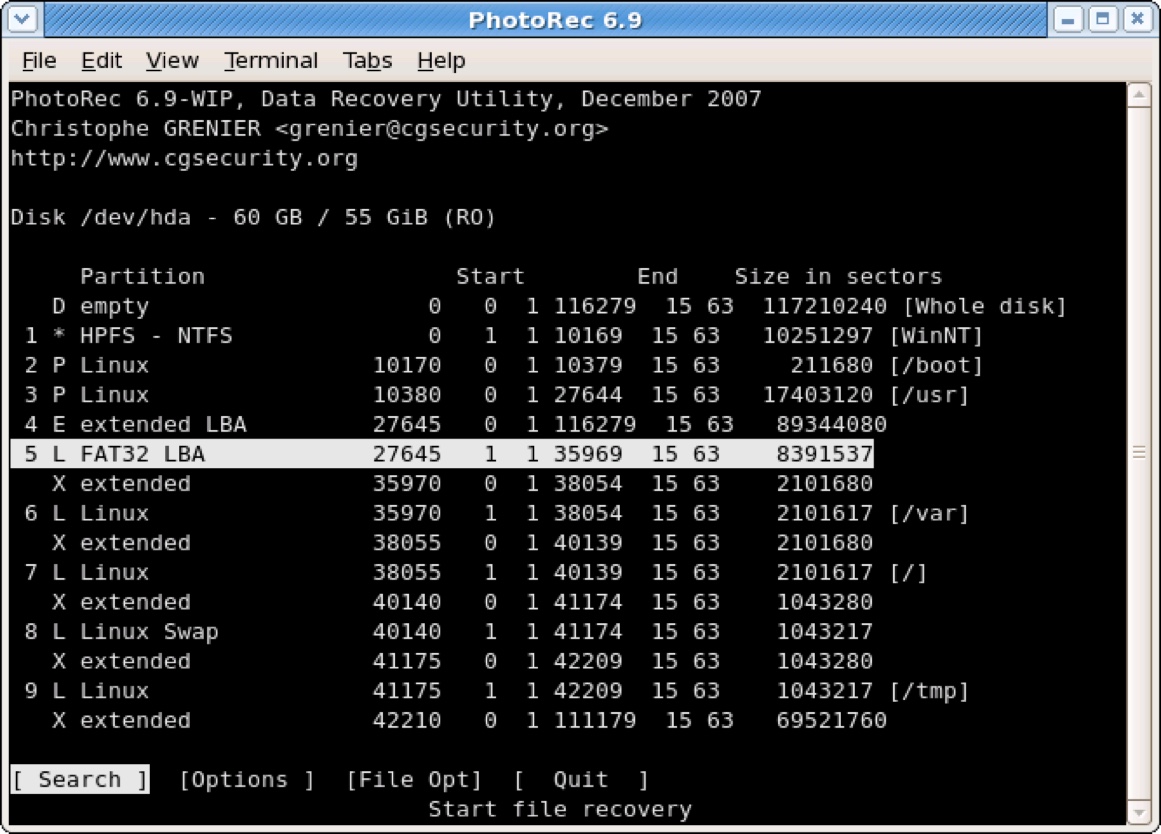
PhotoRec is one of the best photo recovery software for SD cards with a command-line interface. Since it requires knowing commands, it's more suitable for tech-savvy computer users.
Unlike what the name implies, this completely free SD card recovery software is not limited to photo recovery but is able to recover more than 480 file extensions, grouped in about 300 file families, including common document and archive file formats.
- Pros:
- Multi-platform recovery
- Completely free
- Open source
- Does not require installation
- Support FAT, NTFS, exFAT, ext2/3/4, HFS+
- Compatible with Windows 10/8/7/Vista/XP, and Mac OS X
- Cons:
- Command-line interface
- Not applicable for less experienced users
- Doesn't support Windows 11
- Last update was in 2019
- Incompatible with APFS
- Doesn't support newer macOS versions
- No technical support
User experience:
Photorec is an open-source memory card recovery software distributed under the GNU General Public License (GPL v2+). What makes it special is that developers can utilize its source code to create their own version of the software and distribute it under their names.
The biggest downside of this free SD card recovery software is the lack of a graphical user interface. It delivers good results when recovering data from SD cards, but it's not as stable as other tools in this list.
Editor's Review: As a free file recovery solution, PhotoRec does everything a regular home user may expect. However, you wouldn't rely on it for recovering servers and business-critical data. By Sofia Elizabella Wyciślik-Wilson, techradar.com
Recuva (Windows only)
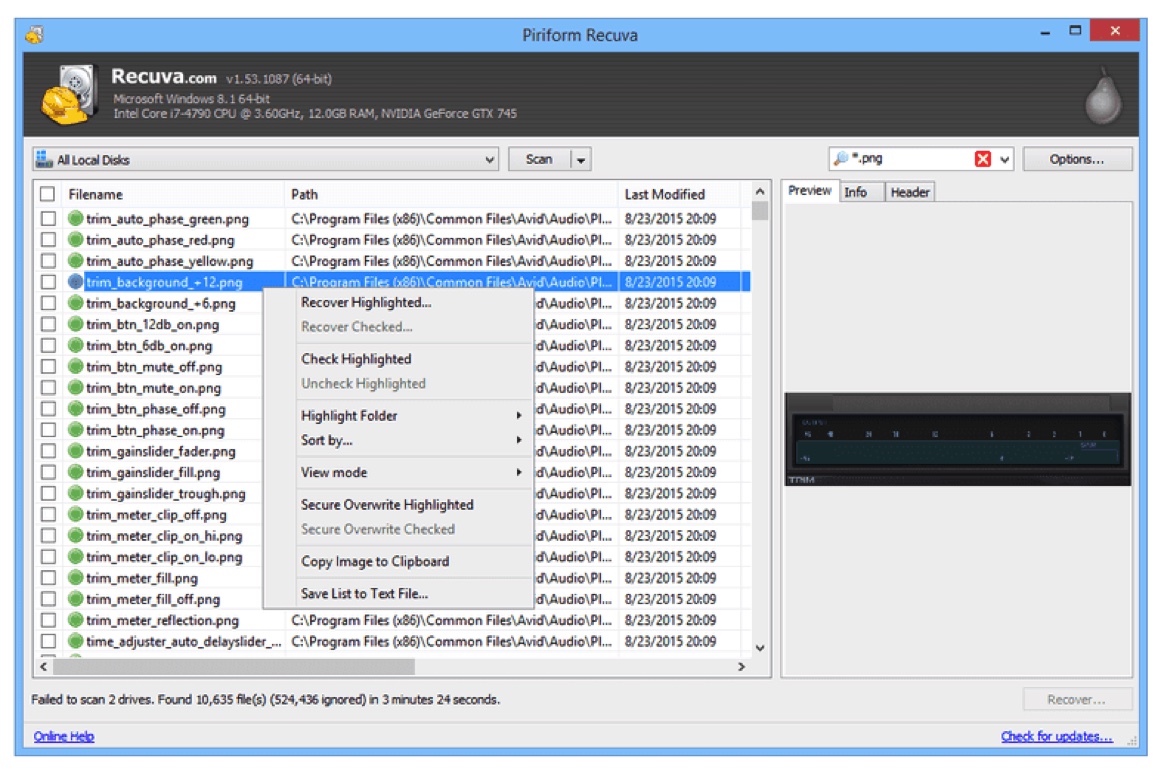
If you are looking for completely free SD card recovery software without a command-line interface, you can give Recuva a try. Just remember that its latest version dates back to 2016, so it's not actively updated anymore and has an interface that came from the Windows XP era.
- Pros:
- Truly free and unlimited data recovery software
- Portable version available
- Support NTFS, FAT, exFAT
- Compatible with Windows 10/8/7/Vista/XP
- Cons:
- Not updated since 2016
- Does not support macOS and Linux
- Unfriendly interface
- Need to configure before starting scanning
- Free version doesn't have support
User experience:
Recuva is a lightweight, free SD card data recovery software developed by the developers of PC optimizer CCleaner. It's known as bundleware that automatically installs CCleaner, so you should pay attention to every step of its installation. This secure digital card recovery tool can also recover deleted data from external hard drives, USB drives, and other storage devices.
It has two versions, Free and Professional. The Free version allows unlimited file recovery. However, the Professional version offers more features, including automatic updates and customer support. It's a good choice for less complicated data loss scenarios but is unavailable for RAW SD card recovery, lost partition recovery, or BitLocker-encrypted SD card recovery.
Editor's Review: Recuva is cheap and easy to use, but it can't recover as many files as other data recovery tools. If you're looking for a file recovery program for someone who's not tech-savvy and doesn't want to spend a lot of money, it could be a good fit. - By Edward Mendelson, pcmag.com
EaseUS Data Recovery Wizard (Windows & macOS)
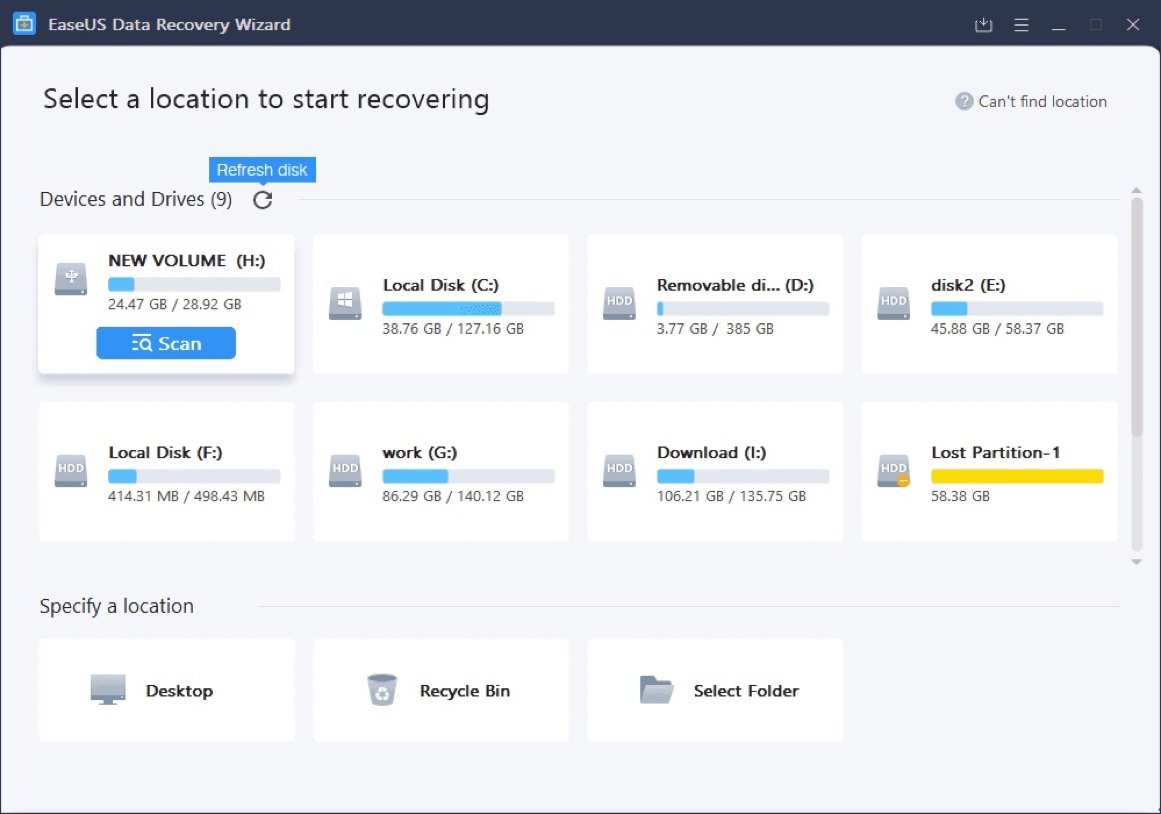
EaseUS Data Recovery Wizard is also one of the best recovery software for SD cards that's available in free and paid versions. Like iBoysoft Data Recovery, it also offers Quick and Deep scan features, allowing users to conduct a more thorough check.
- Pros:
- Simple user interface
- Two scanning modes
- Support various file formats and common file systems
- Good overall performance
- Supports Windows 11/10/8/7 & macOS 27 Golden Gate - OS X 10.9
- Support NTFS, FAT32, exFAT, APFS, HFS+, HFSX file systems
- Cons:
- Expensive lifetime upgrades
- No scan time estimation
- Pop-up ads
- Limited file format support for preview
- Sometimes runs a slower scan
User experience:
EaseUS Data Recovery Wizard is competent SD or microSD card recovery software with a modern interface and a heavy emphasis on general usability. It's safe to say that it's easy to use, even for users with limited or no experience in data recovery.
Arguably, the most unique feature of this data recovery software is its one-on-one remote data recovery assistance, but it's only available in the paid version, which is more expensive than other tools in this list. It offers a generous 2GB free recovery, but only 500MB is usable if you don't share the application on social media networks.
Compared to other free data recovery software for SD cards of the same tier, it can sometimes take more time to finish a scan. But if you are willing to wait, it's still a viable option.
Editor's Review: EaseUS Data Recovery Wizard Pro is a generally capable tool for file recovery, featuring user-friendly operation but exhibiting slow performance. It comes with a relatively high cost, making it less feasible for individual users and more suitable for small business users rather than large corporations, organizations, and public bodies. - By Daniel Blechynden, techradar.com
Disk Drill (Windows & macOS)
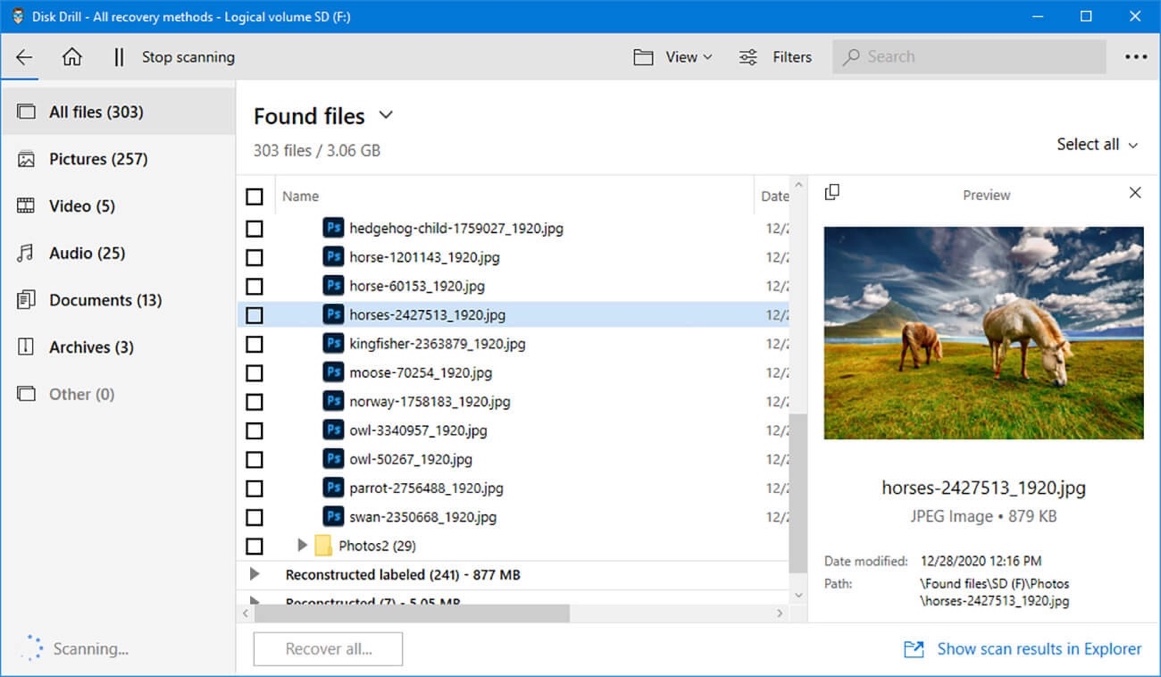
Disk Drill is a user-friendly SD card recovery tool that's capable of recovering data from almost all major operating systems and file formats, such as images, audio files, videos, etc., from not only memory cards, but also USB flash drives, and other storage media.
- Pros:
- Supports a wide range of storage devices
- Two scan modes available
- Easy to use
- Recover data from various file formats
- Supports Windows 11/10 & macOS 26 Tahoe - macOS 10.15.7 (Disk Drill 6)
- Support NTFS, FAT32, exFAT, APFS, HFS+, and HFSX file system
- Cons:
- No free recovery for the macOS version
- Meaningless Recovery Vault folder names
- Quick scan may not find files
- Its latest version is not available on macOS 10.14 or earlier & Windows 8/7/XP/Vista
- Mac version has no free recovery
User experience:
Similar to iBoysoft Data Recovery, Disk Drill can successfully recover most of the deleted or lost data from SD cards too, though you likely need to enable "Deep Scan" before starting recovery, as its "Quick Scan" mode sometimes won't show you any files. Its Windows version allows you to preview files and recover 500 MB of data for free.
It was hard to locate the specific file one wants to recover after a scan with the older version of this free SD card recovery software. However, its latest version (Disk Drill 6) is much improved, though it's only accessible to certain operating systems (Windows 10/11 & macOS 10.15.7 or later).
Editor's Review: Disk Drill is a comprehensive disk recovery solution with an intuitive UI. It's a great recovery option for both Windows and macOS, supporting a wide range of media types and files. However, its Pro version is expensive, and the Recovery Vault folder names are pointless. - By Christian Cawley, techradar.com
Please share this post to help more people start free SD card data recovery!
Recoverit Free Data Recovery (Windows & macOS)
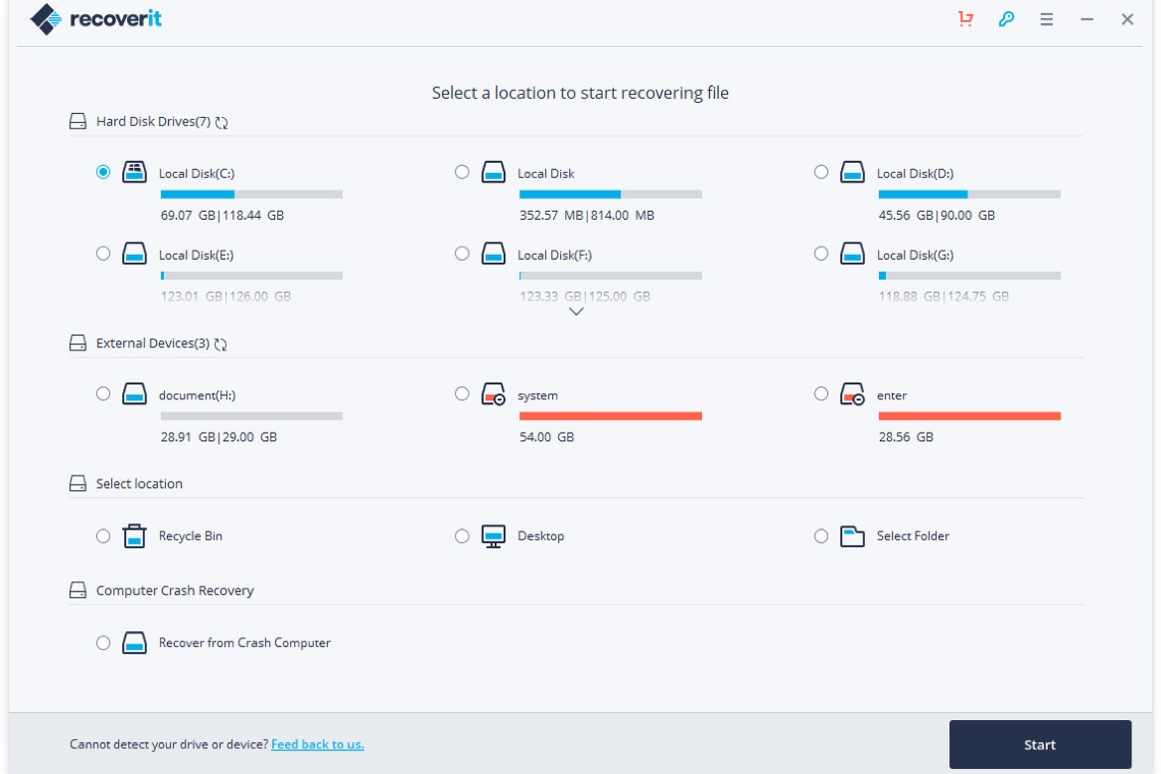
Recoverit Free Data Recovery software boosts a 3-step recovery process with a clean user interface and demonstrated data recovery capabilities. Its free version can recover files of 100MB, which may not be much but gives you a chance to test the software's ability.
- Pros:
- Clean UI
- Deep scan available
- Money-back guarantee
- Recover files from NTFS, FAT, HFS+, and APFS file systems
- Compatible with Windows 11/10/8/7/Vista/XP & macOS 26 Tahoe - macOS X 10.10
- Cons:
- Can only preview limited file types
- No indication of the quality of recoverable files
- Too many versions to choose from
- No recovery time estimation
- Can't filter scan results
- Can't scan the whole disk
User experience:
This popular memory card data recovery software has a good average review score on TrustScore, with users complimenting its quick recovery times, helpful customer service, and money-back guarantee.
However, it failed to find lost data from formatted APFS and HFS SD cards in our test. Another weakness of this memory card recovery is that it doesn't allow users to scan the whole drive or save a scanned session.
Since this SDHC card data recovery software has limited free recovery, you can upgrade to one of its three paid subscriptions: Essential, Standard, or Advanced. As the name suggests, to acquire advanced data recovery features like video recovery, you need to pay for the Advanced version, which is $99.99 per year.
Editor's Review: Wondershare Recoverit is a capable photo recovery solution that works on practically any device. But we were let down by the unavailability of the promised 100MB of free recovery quota, although the 'Preview' feature did allow us to view most file formats. - By Mike Jennings, techradar.com
Stellar Data Recovery (Windows & macOS)
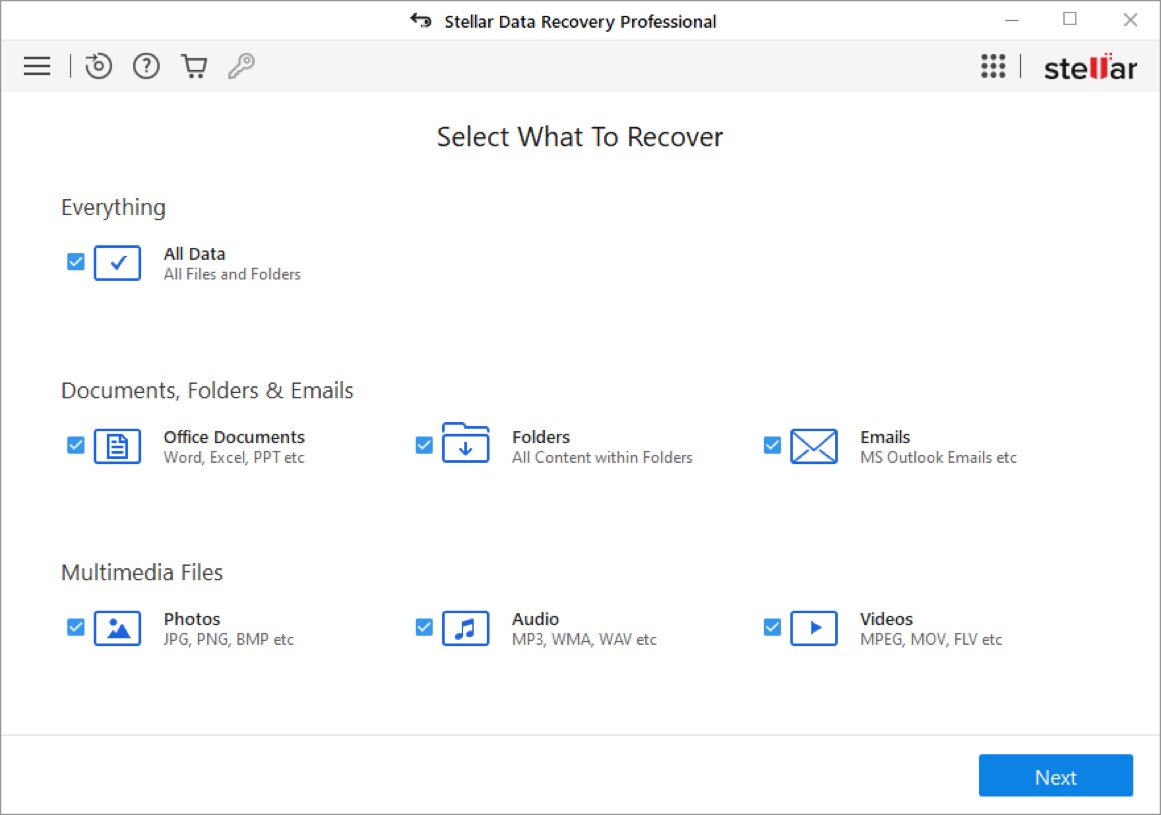
Stellar Data Recovery is yet another SD or microSD recovery software that has been around in the data recovery market for ages. It can recover lost files from USB flash drives, hard drives, SSDs, etc. for photos, emails, videos, and audio files.
Its intuitive interface and well-thought-out organization also make it one of the easy-to-use free data recovery software for SD cards.
- Pros:
- Preview files before recovery
- Intuitive interface
- Retrieve data from BitLocker-encrypted SD cards
- Support NTFS, FAT32, exFAT & APFS, and HFS+
- Compatible with macOS 26 Tahoe or earlier
- Repair photos and videos
- Cons:
- Slow and limited preview
- Slow scanning speed
- Expensive subscription
- Less-than-average performance
User experience:
The free version of Stellar Data Recovery offers a free way to recover deleted files from SD cards but limits the recovery to 1GB. It can deal with about every commonly used file format and SD card of any brand. It has several advanced data recovery features, such as corrupted photo recovery and advanced RAID restoration.
However, these come with a big price. To repair corrupted photos and videos, you need to upgrade to the premium version, which costs $79.99 at a discount. As for recovering files from RAID drives, the monthly subscription tops $199.
Editor's Review: Stellar Data Recovery recovers lost files from all types of devices and informs you beforehand which files are recoverable. Nevertheless, it often can't deliver its recovery promises and has no automatic list for deleted files. - By Edward Mendelsonm, pcmag.com
MiniTool Power Data Recovery (Windows & macOS)
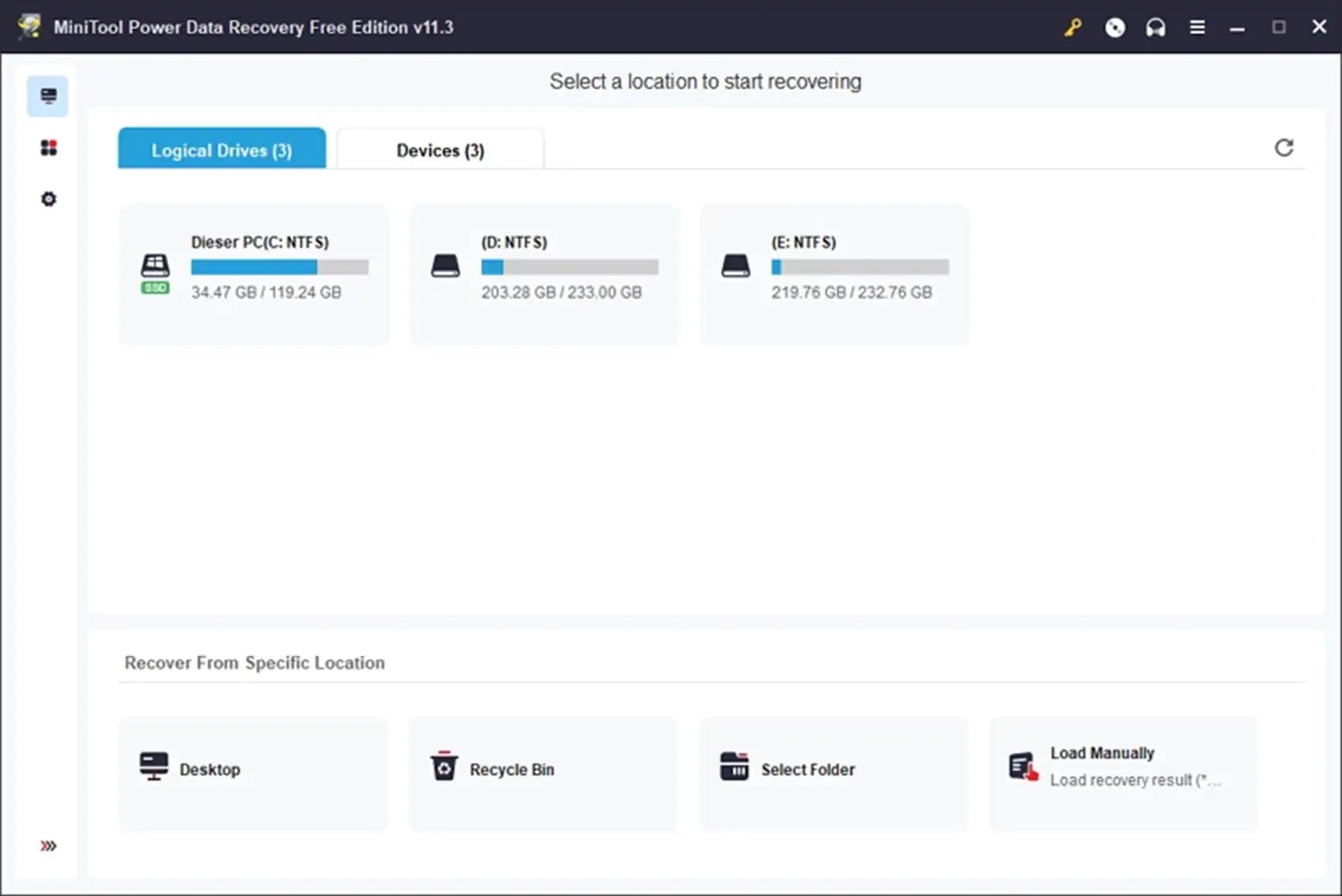
MiniTool Power Data Recovery enables every user to use it for secure digital card recovery with its simplified data recovery process. That's also part of the reason why it's on our list of best recovery software for SD cards.
It's a well-maintained free SD card data recovery app that receives updates regularly, allowing it to perform well when handling new or less-common file formats.
Tips: MiniTool Power Data Recovery is Windows-only and does not have a native Mac version. However, MiniTool provides Mac support by distributing and partnering with Stellar Data Recovery for Mac under their official brand ecosystem.
- Pros:
- Intuitive user interface
- Fast scanning speed
- Allow users to create a bootable disk
- Frequently updated
- Support Windows/11/10/8/7 & macOS 26 - Mac OS X 10.7
- Compatible with NTFS, FAT32, exFAT, UDF, APFS, and HFS+
- Cons:
- Free version can't fix corrupted videos
- Free version has no built-in file previewer
- Modified settings not saving
- Limited preview features
- Mac version only has 1MB free recovery
- Can't resize the main screen
- Expensive subscriptions
- All file types are not chosen by default
- Fake scan types
User experience:
MiniTool Power Data Recovery can retrieve more than 100 file types, but it only offers the previewing of up to 70 formats, including documents, archives, video, audio files, images, and other files. It has dedicated scan options for the Trash Can, Desktop, and a Selected folder, which is supposed to save a lot of time spent on scanning the whole drive.
Unlike iBoysoft, which can automatically detect BitLocker-encrypted SD cards, Recoverit Free Data Recovery can only scan BitLocker drives when they're manually unlocked. Also, it's not easy to locate a target partition, as there are no names.
Though it claims to recover data from most of the common SD file systems, including FAT32, exFAT, NTFS, HFS, APFS, and HFS+, it actually has insufficient support for HFS+. If you accidentally formatted an HFS+ SD card, it can't restore the structure.
Nevertheless, this is only a marketing tactic, as it's not possible to scan a specific folder on a drive for lost data. The SD or microSD recovery software simply runs a quick scan of all your drives. Its Windows version offers 1GB of free data recovery.
However, the free version doesn't allow you to preview any recoverable files without additionally installing a file previewer.
Editor's Review: MiniTool Power Data Recovery does a decent job of recovering mainstream photography files but suffers from an old-fashioned UI design and lacks high-end features. - By Mike Jennings, techradar.com
Conclusion
After comparing the key features and performance of the top 8 best SD card recovery tools, we can conclude that iBoysoft Data Recovery is one of the cheapest SD card recovery software with impressive advanced data recovery features.
This best micro SD card data recovery software empowers you to recover files from even the most difficult data loss scenarios with a few simple clicks.
If you haven't installed it, you can now download it for free and preview your files instantly.