
 Serena Wang
 Jessica Shee
A BitLocker-encrypted drive does not always need to be permanently decrypted before you can use its files. Depending on the situation, you may only need to unlock and mount the drive with the correct password or recovery key. Permanent decryption removes BitLocker protection and may take time, so choose that option only when you intentionally want to remove encryption.
Choose the Right BitLocker Solution
| User goal | Correct term | Recommended route |
| Access files while keeping encryption | Unlock/mount | BitLocker access tool - M3 BitLocker Loader |
| Remove encryption permanently | Decrypt/turn off BitLocker | Windows BitLocker management or BitLocker Anywhere for Windows/Mac |
| Open BitLocker drive on Mac | Unlock, read/write access on Mac | Use a 3rd-party BitLocker for Mac - iBoysoft BitLocker for Mac |
| Recover a key from memory or forensic evidence | Forensic key extraction | Authorized professional forensic workflow |
Quick Comparison Table
| Tool | Platform/Versions | Requires credentials | Corrupted drive recovery | Primary use | Permanent decryption |
| Windows BitLocker Management | SCCM/MECM supported by Windows 10/11/8.1; MBAM supported by Windows 7, 8, 8.1,10, and Windows Server editions |
Yes | No | Turn off BitLocker on Windows | Yes |
| Windows manage-bde/PowerShell | 1. To manage BitLocker via command line on Windows 7, use manage-bde. 2. On Windows 8, 8.1, 10, 11, and Windows Server 2012+, you can use both manage-bde and native PowerShell cmdlets. 3. Ensure the target machine is running a Pro, Enterprise, Education, or Server edition of Windows. |
Yes | No | Commandline management |
Yes |
| M3 BitLocker Loader | Windows 7 SP1, 8, 8.1, 10,11, Windows Server 2008 R2, Server 2012 | Yes | Not primarily | Unlock and manage BitLocker on unsupported Windows editions | No |
| iBoysoft BitLocker for Mac | macOS Golden Gate 27 - macOS High Sierra 10.13 | Yes | Not primarily | Unlock, open and write to BitLocker drives on Mac | No |
| Hasleo BitLocker Anywhere for Windows | Windows client OS and server OS (Windows 11 - Win 7 with Home, Core, and Starter editions, as well as Windows 7 Professional supported) | Yes | Not primarily | Decrypt and turn off BitLocker on Windows | Yes |
| Hasleo BitLocker Anywhere for Mac | macOS Tahoe 26 - macOS Mojave 10.14 | Yes | Not primarily | Decrypt and turn off BitLocker on Mac | Yes |
| Passware Kit Forensic | Windows/macOS forensic workflow | Depends on evidence | Not ordinary recovery | / | Forensic decryption |
| Elcomsoft Forensic Disk Decryptor | Windows/macOS forensic workflow | Depends on recovered keys or evidence | Not ordinary recovery | / | Forensic decryption |
Before You Decrypt a BitLocker Drive
- Confirm whether you want temporary access or permanent removal of BitLocker encryption.
- Locate the correct password or 48-digit recovery key.
- Back up important files before starting a long decryption operation.
- If the drive is RAW, corrupted, formatted, or disappearing, recover data before repair or decryption.
- Do not save recovered files back to the affected BitLocker drive.
- Do not rely on software promising to bypass BitLocker without authorization or valid credentials.
Best BitLocker decryption tools free - Built-in Windows Tools
If you are using one of the following versions of Windows, you can use the built-in BitLocker decryption feature to decrypt your BitLocker disk and disable BitLocker encryption.
- Windows 11 Pro/Enterprise/Education
- Windows 10 Pro/Enterprise/Education
- Windows 8 Pro/Enterprise
- Windows 7 Ultimate/Enterprise
- Windows Server 2008 and later Standard/Enterprise/Datacenter
BitLocker management interface
Windows provides a built-in interface for managing BitLocker-encrypted drives. Users can decrypt a drive using the BitLocker management tool found in the Control Panel or the Settings app in Windows 10 and later versions.
Step 1. Go to Control Panel or Settings and go to System and Security.
Step 2. Click the BitLocker Drive Encryption to open it.
Step 3. Select the encrypted drive you want to decrypt.
Step 4. Click the Turn Off BitLocker and enter either the password or the recovery key when prompted.
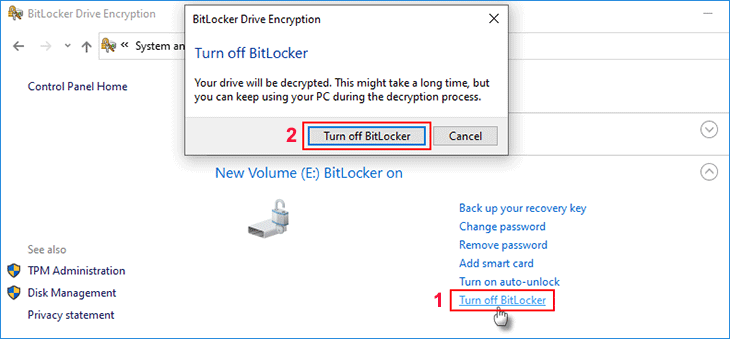
The decryption process may take some time depending on the size of the drive and the amount of data stored on it. Once decryption is complete, the drive will be converted back to its regular, unencrypted state. You can then access the data on the drive as usual.
BitLocker decryption command line tools
Windows provides command-line tools such as manage-bde and PowerShell for handling BitLocker decryption and other related tasks. These tools require correctly inputting command lines to unlock a BitLocker-encrypted drive and disable encryption. They are particularly useful in scenarios where you cannot access the Windows system normally but have Command Prompt access.
Step 1. Open Command Prompt as an administrator.
Step 2. Type one of the following commands. Remember to replace the letter X with the drive letter of the BitLocker encrypted drive.
manage-bde -unlock X: -Password
Or
manage-bde -unlock X: -RecoveryPassword
Step 3. Then run this command to disable the BitLocker.
manage-bde -off X:
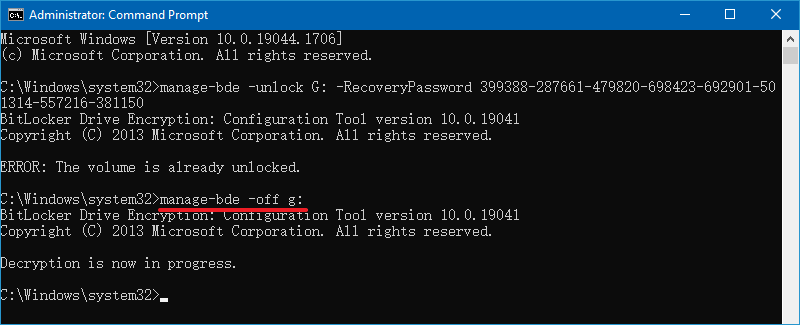
Step 4. When finished, the drive should be unlocked, and the Bitlocker should be disabled.
Top BitLocker Unlock Tool for Windows/Mac
M3 BitLocker Loader for Windows (Ver 4.8)
M3 BitLocker Loader for Windows allows users on unsupported Windows editions to easily lock and unlock BitLocker-encrypted drives. While Windows 10/11 Home provides basic auto-prompt unlocking, earlier Home editions—like Windows 7 and 8—offer no native BitLocker support at all.
Beyond opening encrypted drives, M3 BitLocker Loader enables full BitLocker drive encryption directly on Windows 11/10/8/7 Home and Windows 7 Professional. This allows you to secure your data without paying for an expensive Windows Pro upgrade.
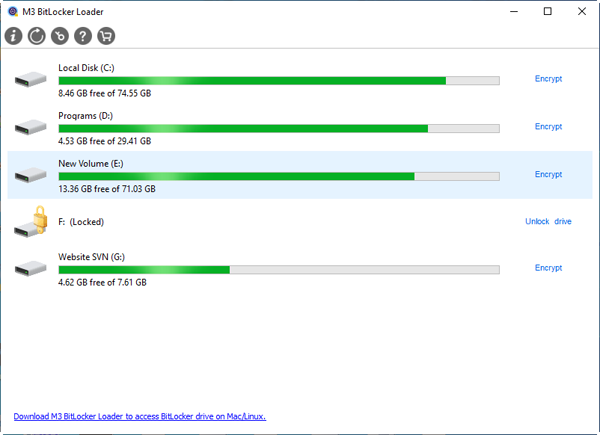
Key features:
- Unlock BitLocker-encrypted data partitions on unsupported Windows Home editions
- Encrypt drives using Microsoft BitLocker drive encryption on unsupported Windows editions
- Ensure no data loss during the BitLocker encryption and decryption processes
- Lock BitLocker drives without restarting Windows
Note: M3 BitLocker Loader for Windows cannot encrypt your system drive (C: drive). If you need to secure personal files stored on C:, the best approach for data security is to create a new partition and move your files there before encrypting it.
iBoysoft BitLocker for Mac (Ver 8.1)
Having tested iBoysoft BitLocker for Mac across various workflows, it easily caters to users of all technical backgrounds in unlocking BitLocker drives through two flexible modes:
- File Manager Mode (For everyday users): Offers a lightweight, hassle-free way to unlock, view, export, and import files without configuring System Extensions or granting Full Disk Access permissions
- Volume Mounter Mode (For advanced workflows): Mounts the BitLocker partition directly as a physical drive, delivering native-level read/write speeds and rock-solid stability in Finder
Broad Chipset Compatibility: Unlike the latter BitLocker decrypter Hasleo—which often lags behind on macOS and Apple Silicon updates— iBoysoft provides complete, day-one support across all macOS (Golden Gate 27 to High Sierra 10.13) and Apple Silicon generations (M1 through M5) as well as Intel Macs.
Key features:
- Detect and recognize Microsoft BitLocker drives on Mac
- Mount a BitLocker-encrypted drive like a Mac native hard drive
- Unlock BitLocker disks with full read-write access
- Encrypt external drives with BitLocker on Mac
- Support Microsoft NTFS, exFAT, FAT file systems
How to Use iBoysoft BitLocker for Mac to Unlock BitLocker Drives?
Step 1. I downloaded iBoysoft BitLocker for Mac (Version 8.1) directly from the official website and installed it on my MacBook Air running macOS Monterey (12.7.6). The entire download and installation process was fast, smooth, and hassle-free.
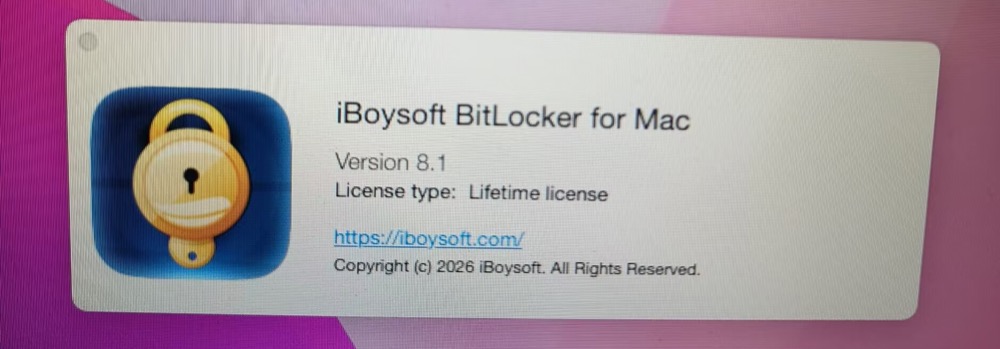
Step 2. Launch the BitLocker To Go for Mac app.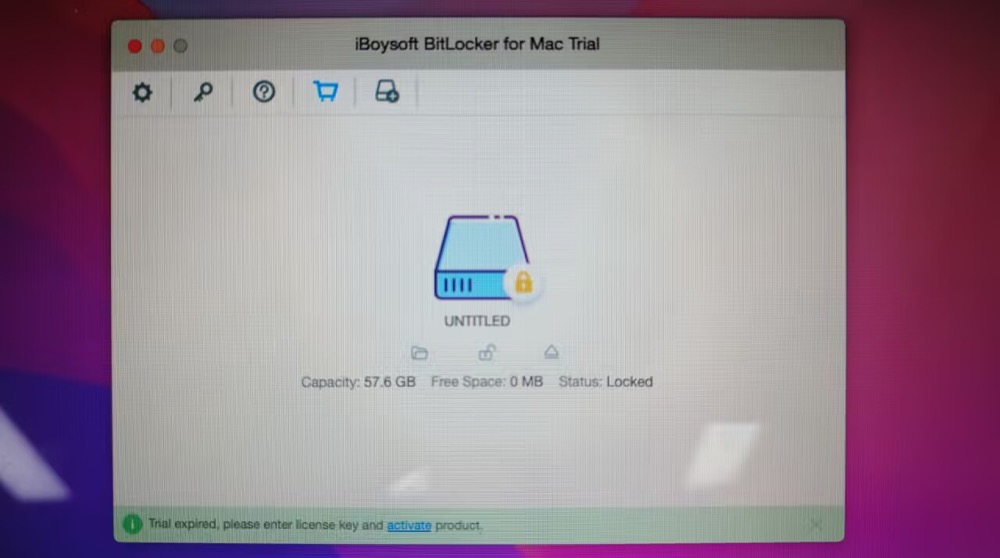
Step 3: Insert your external BitLocker-encrypted NTFS drive into your Mac. The software will instantly detect the drive and display its status as Locked.
Step 4: Click Unlock and enter your BitLocker password. Check the box for "Remember this password in my keychain" if you want the drive to unlock automatically every time you connect it in the future. 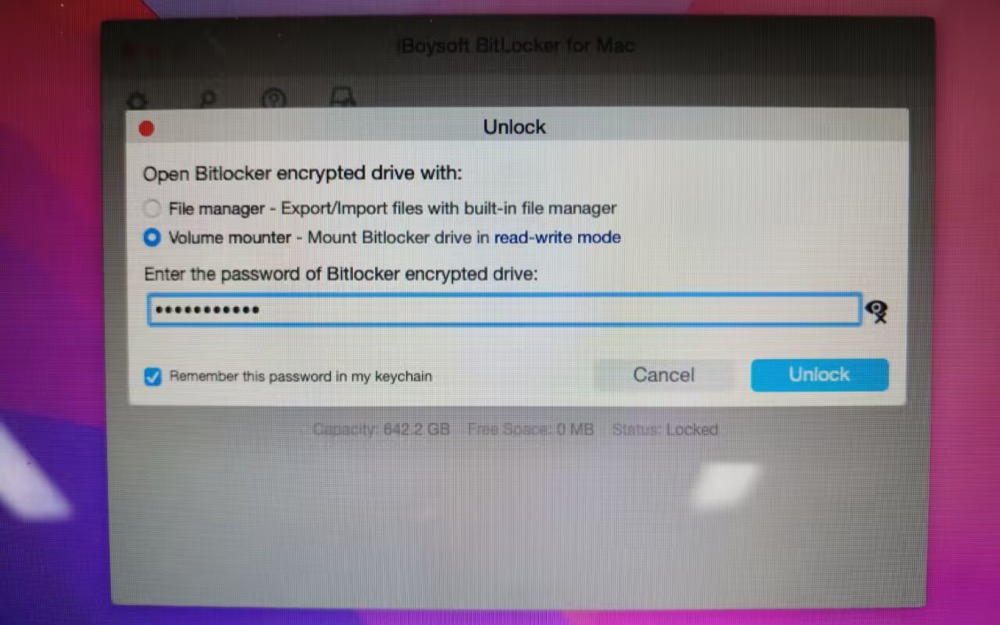
iBoysoft offers two ways to access your BitLocker drive on Mac:
File Manager (Virtual Mount): Requires no System Extensions or Full Disk Access permissions. Its built-in explorer lets you preview, import, export, rename, delete files, and create folders instantly.
Volume Mounter (Physical Mount): Mounts the drive directly in Finder like a native Mac volume, giving you full read/write access to open, edit, and duplicate files seamlessly.
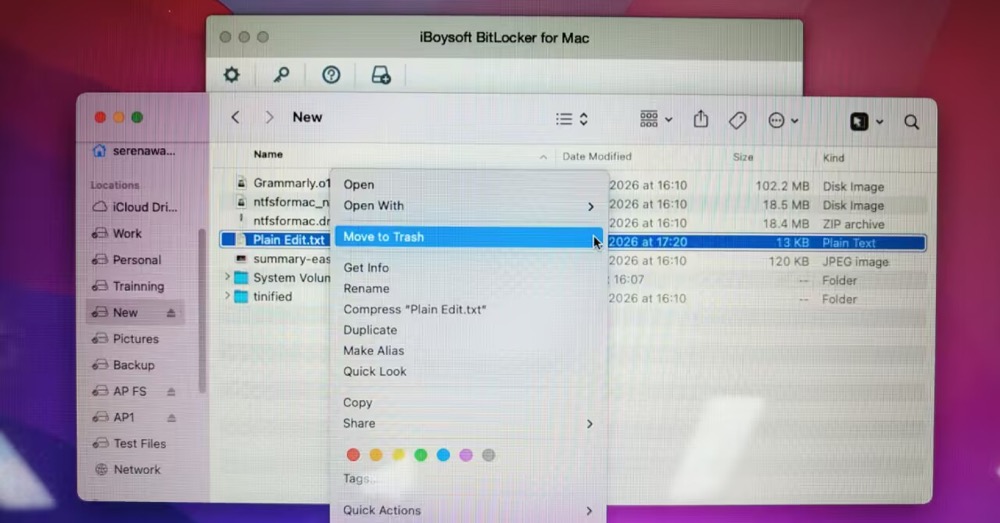
Transferring a 14.24 GB ISO file yielded write speeds of up to 131 MB/s and read speeds of 140.4 MB/s—virtually matching the drive's native HDD performance. I was thoroughly impressed with its speed.
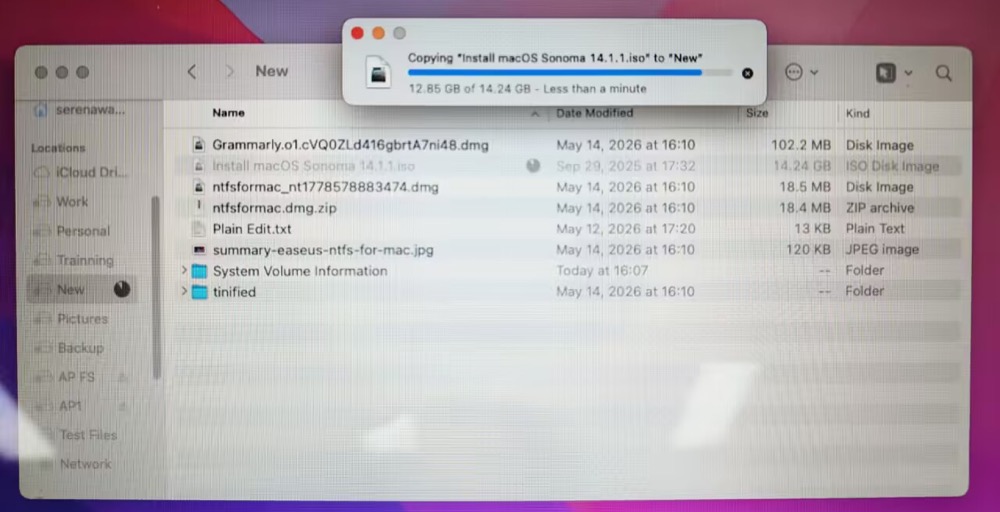
On top of the BitLocker unlocking feature, I'm also surprised to find that it supports external drive encryption for Mac and Windows with BitLocker algorithms.
Since drive encryption isn't the main focus of this guide, we won't go into detail here. However, if you're interested, you can check out our full guide on how to BitLocker-encrypt your removable drives.
Step 5. Click Eject on its main interface to eject my BitLocker drive after my reading and writing jobs are done.
Top BitLocker Decryption Tool for Windows/Mac
The 3rd-party BitLocker decryption tool recommended here Hasleo BitLocker Anywhere, with Windows and Mac versions. Both versions support core functions like encrypting, decrypting, changing passwords, and exporting recovery keys.
Hasleo BitLocker Anywhere for Windows (Ver 9.9)
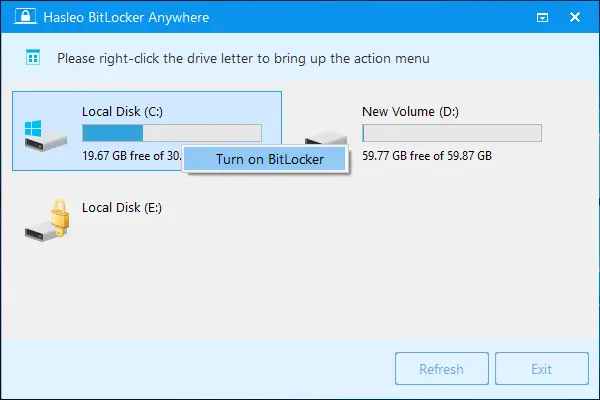
Its Windows edition brings BitLocker drive encryption and management capabilities to Windows editions that do not natively feature BitLocker and can also decrypt BitLocker-protected drives in both Windows client OS and server OS (Windows 11 - Win 7 with Home, Core, and Starter editions, as well as Windows 7 Professional supported).
Key features:
- Decrypt BitLocker-encrypted Windows C: drive & data partitions
- Encrypt storage devices like hard drives and USB flash drives with BitLocker
- Enjoy a user interface that mirrors Windows, making it familiar and intuitive for Windows users
Hasleo BitLocker Anywhere for Mac (Ver 9.9)
Its Mac edition allows you to decrypt BitLocker drive on Mac, as well as unlock, mount, read & write BitLocker drive on macOS Tahoe 26 - macOS Mojave 10.14, and encrypt USB drives for Windows/Mac. If you're an expert user, you can also use its command-line interface to decrypt BitLocker drives on macOS.
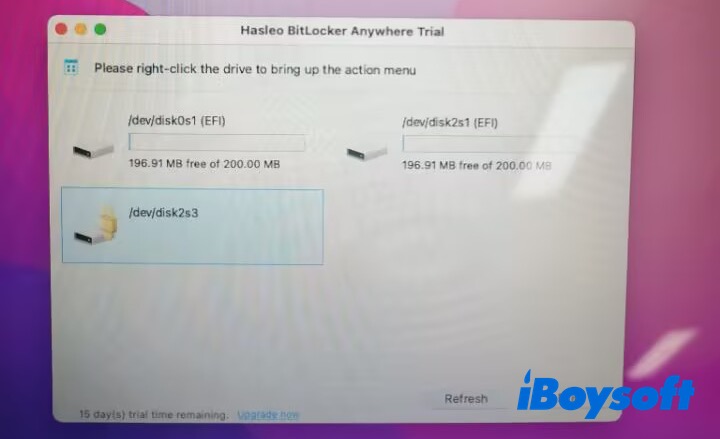
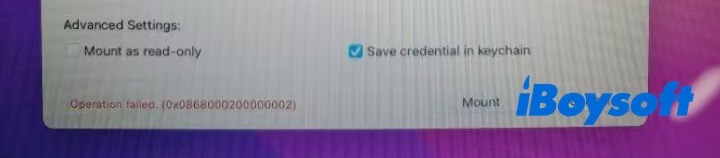
To use Hasleo on Mac, the whole operation is more complex than that on Windows. It requires you to enable System Extensions, grant full disk access, and more importantly install the latest macOS FUSE 5.2.0 version. Or you'll encounter the operation failure like I did before.
Key features:
- BitLocker drive mount and full read & write access
- Decrypt existing BitLocker volumes, converting them back into standard unencrypted drives directly within macOS
- Apply BitLocker encryption directly to unencrypted external storage devices on macOS
- Change access passwords on BitLocker drives, and export recovery key
Key usage limitation: Hasleo BitLocker Anywhere for Mac works exclusively with external drives (USB drives, external HDDs/SSDs, memory cards). It cannot encrypt or manage internal macOS boot/startup disks, as macOS uses Apple's native FileVault for system-level drive security.
If these tools are what you are looking for, please spread the word.
BitLocker Decryption Services without the Password or Recovery Key
Without the correct password, recovery key, or BEK file, standard BitLocker decryption is impossible. However, specialized forensic tools can sometimes extract keys directly from system memory or TPM chips. Because these investigative methods require advanced hardware and expertise, the process is costly and typically handled by professionals.
Notable BitLocker forensic services include:
Passware Kit Forensic
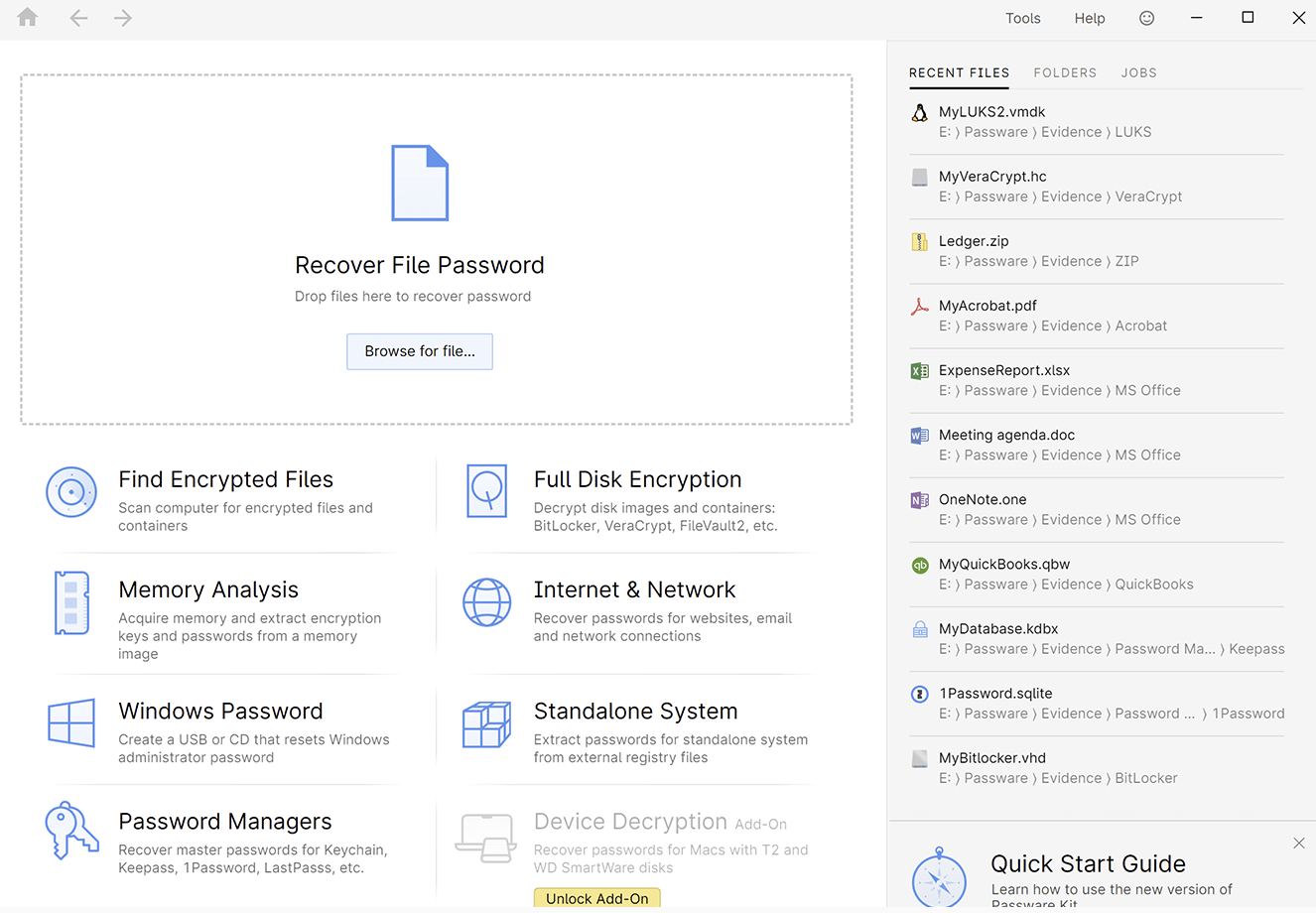
Passware Kit Forensic is a comprehensive forensic tool that supports decrypting BitLocker-encrypted volumes. It can decrypt or recover passwords for BitLocker full disk encryption. It supports batch processing for multiple BitLocker-encrypted drives at once.
Key features:
- Decrypt or recover passwords for BitLocker-encrypted drives
- Decrypt all password-protected items on a computer
- Decrypt or recover passwords for other disk encryption methods such as APFS, Apple DMG, FileVault2, LUKS and LUKS2, McAfee, PGP, Steganos, Symantec, TrueCrypt, and VeraCrypt disk images
- Analyze live memory images and hibernation files and extract encryption keys
Elcomsoft Forensic Disk Decryptor
Elcomsoft Forensic Disk Decryptor is a commercial tool used by forensic experts to decrypt BitLocker. It requires the original encryption keys or passwords. But if you don't have it, this tool extracts cryptographic keys from RAM captures, hibernation, and page files or uses plain-text password or escrow keys to decrypt files and folders stored in crypto containers.
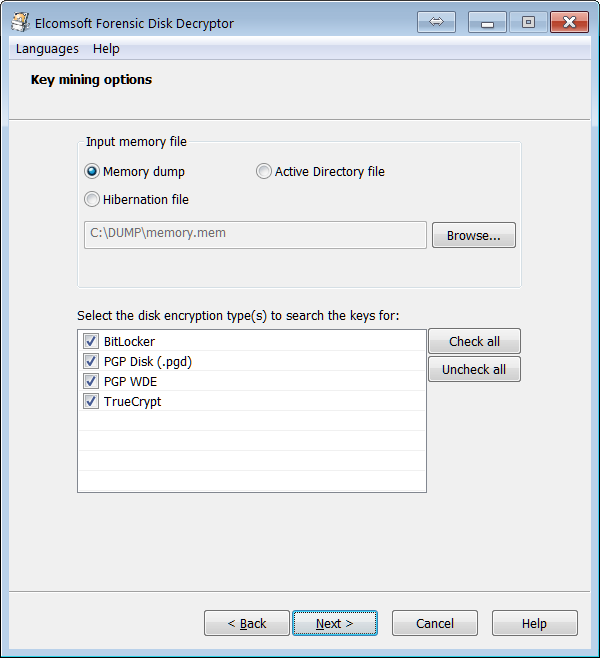
Key features:
- Decrypt volumes encrypted by BitLocker or BitLocker To Go
- Extractencryption metadata from the BitLocker encrypted dis
- Instantly mount encrypted containers as drive letters
- Access to information stored in disks and volumes encrypted with FileVault 2, LUKS, LUKS2, PGP Disk, TrueCrypt, and VeraCrypt
Verdict
Native Windows Tools (CMD / BitLocker Manager): Best overall option—free, built-in, and natively decrypts drives.
Edition Workaround (M3 BitLocker Loader): Enables BitLocker unlocking and encryption on Windows editions that lack native support.
macOS Access (iBoysoft BitLocker for Mac): Allows Mac users to unlock and access BitLocker-protected drives.
Third-Party Decryption (Hasleo BitLocker Anywhere): Permanently decrypts and turns off BitLocker encryption without Windows Pro/Enterprise.
Forensic Recovery (Passware Kit / Elcomsoft): Extracts keys from TPM chips or RAM when passwords or recovery keys are lost (expensive; often requires technical expertise).
If you find this article informative and helpful, please help up share it.